

















































Windows 11 KB5089573 Update 2026: Top New Features, Faster Performance & AI Upgrades Explained
Microsoft has officially released the 2026-05 Preview Update (KB5089573) for Windows 11, bringing one of the biggest performance-focused upgrades of the year. The new update, available for Windows 11 versions 24H2 and 25H2, introduces a powerful Low Latency Profile, improved AI monitoring, Shared Audio support, Multi-App Camera functionality, faster Search experience, and several reliability improvements. With Build 26200.8524, Microsoft is focusing heavily on making Windows feel faster, smoother, and more responsive in everyday tasks. Whether you are a gamer, student, content creator, or office user, this update includes multiple enhancements that improve productivity and overall system performance.
What is Windows 11 KB5089573?
KB5089573 is an optional preview update released by Microsoft for Windows 11. It serves as a testing ground for upcoming features before they arrive in future mandatory Patch Tuesday updates.
The update upgrades Windows 11 to OS Build 26200.8524 and includes performance optimizations, AI-related enhancements, Bluetooth improvements, camera upgrades, storage changes, and bug fixes.
Low Latency Profile: Biggest Performance Upgrade
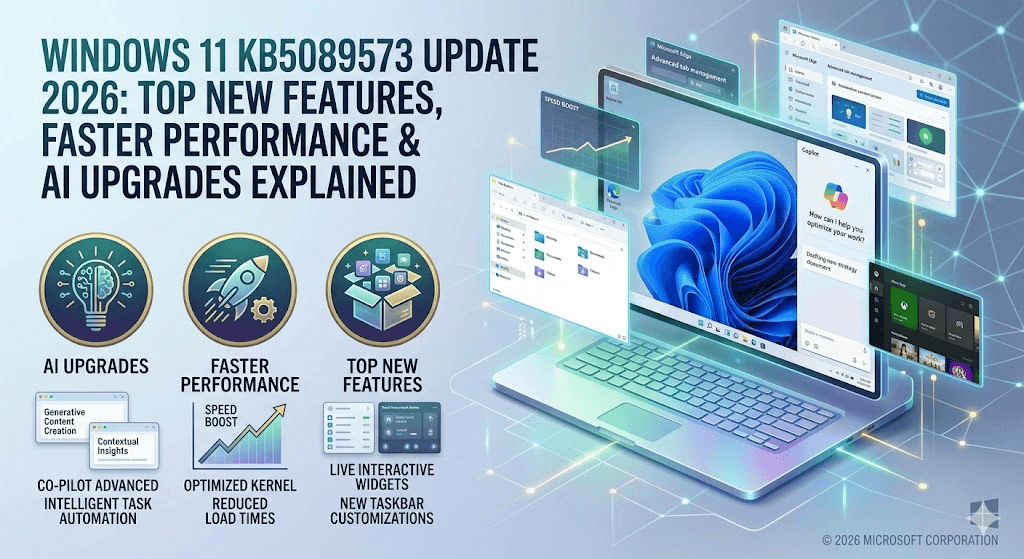
The headline feature of KB5089573 is the new Low Latency Profile, designed to improve responsiveness throughout Windows.
Microsoft has optimized:
- Start Menu performance
- Windows Search speed
- Action Center responsiveness
- App launching times
- Core shell experiences
According to reports, some interface animations can appear significantly faster, while application launch times may improve noticeably on many systems. The feature works by temporarily boosting CPU performance during latency-sensitive tasks.
Shared Audio Support for Bluetooth Devices
Windows 11 now introduces Shared Audio, allowing two Bluetooth LE Audio-supported devices to listen to the same audio source simultaneously.
This feature is useful for:
- Watching movies together
- Listening to music with friends
- Online learning sessions
- Travel entertainment
The functionality works through Bluetooth LE Audio broadcast technology and is available on supported hardware.
AI & NPU Monitoring in Task Manager
Microsoft continues expanding AI integration inside Windows.
The updated Task Manager now includes:
- NPU usage monitoring
- NPU Engine tracking
- AI memory usage statistics
- Neural Engine visibility
- AI workload monitoring
These additions help users better understand AI processing activity on Copilot+ PCs and future AI-powered devices.
Multi-App Camera Feature
A brand-new Multi-App Camera mode allows multiple applications to access a single webcam simultaneously.
Examples include:
- OBS Studio + Microsoft Teams
- Streaming + Recording together
- Security monitoring software
- Professional content creation workflows
Microsoft also introduced a Basic Camera Mode that improves troubleshooting and camera stability.
Faster Windows Search & Login Experience
Microsoft has enhanced the Windows Search engine to locate files more efficiently.
New improvements include:
- Search results appearing with as few as two characters
- Better file prioritization
- Faster indexing performance
Windows Hello has also been upgraded to prioritize Face Recognition and Fingerprint authentication automatically whenever available.
Additional Improvements Included
KB5089573 brings several quality-of-life upgrades:
| Feature | Improvement |
|---|---|
| User Folder Setup | Custom folder names during Windows installation |
| USB Reliability | Better USB4 dock compatibility |
| Storage Settings | Improved Dev Drive management |
| Touch Keyboard | Better reliability on login screen |
| Clipboard History | Faster navigation performance |
| Desktop Icons | Improved loading reliability |
| Microsoft Store | Faster downloads and bandwidth optimization |
| Task Scheduler | Saves column layouts automatically |
These changes aim to improve the overall Windows experience across laptops, desktops, and enterprise devices.
Known Issue in KB5089573
Microsoft has acknowledged an installation issue affecting some devices with low free space in the EFI System Partition (ESP).
Affected users may encounter:
- Error Code 0x800f0922
- Installation failure at 35–36%
- Automatic rollback after restart
Microsoft is currently working on a permanent fix while providing temporary workarounds for affected users.
Extra Safety Tips 2026
• Create a system restore point before installing preview updates.
• Backup important files before major Windows upgrades.
• Ensure at least 20 GB free storage is available.
• Update chipset and graphics drivers before installation.
• Check Secure Boot certificate updates before June 2026.
FAQs
Q1. What is KB5089573?
KB5089573 is the May 2026 Windows 11 Preview Update that upgrades systems to Build 26200.8524.
Q2. What is the Low Latency Profile feature?
It is a new performance optimization designed to make Windows feel faster by reducing UI and application latency.
Q3. Does Shared Audio support all Bluetooth devices?
No. It requires compatible Bluetooth LE Audio-supported hardware.
Q4. Is KB5089573 mandatory?
No. It is currently an optional preview update.
Q5. Which Windows versions support this update?
Windows 11 Version 24H2 and 25H2 are supported.
| SEO Element | Details |
|---|---|
| Focus Keyword | Windows 11 KB5089573 Update 2026 |
| SEO Title | Windows 11 KB5089573 Update 2026: New Features, Low Latency Profile & AI Improvements |
| Meta Description | Windows 11 KB5089573 Build 26200.8524 brings Low Latency Profile, Shared Audio, AI monitoring, Multi-App Camera and major performance improvements. |
| Category | Tech News |
| Tags | Windows 11 Update, KB5089573, Windows 11 25H2, Microsoft Update 2026, Low Latency Profile |
| Reading Time | 5 Minutes |
Join Our WhatsApp Channel
हमसे जुड़ें — सबसे पहले जानकारी पाएं
Latest tech tips, tricks & tutorials — direct aapke inbox mein
Conclusion
The Windows 11 KB5089573 Preview Update is one of Microsoft’s most important releases of 2026, especially for users seeking better responsiveness and smoother performance. The introduction of the Low Latency Profile, Shared Audio functionality, AI-focused Task Manager enhancements, and Multi-App Camera support shows Microsoft’s growing focus on productivity and AI-driven computing. While the update remains optional for now, many of these features are expected to become part of future stable Windows releases. Users who enjoy testing new capabilities can install the update today and experience Microsoft’s latest improvements before the wider rollout.
Related Posts
- AI Fashion Pose Prompt 2026: Single Pose Prompts से Viral Kids Fashion Images कैसे बनाएं
- Import Clearance Manager Recruitment 2026: Sricity में 12–18 Years Experienced Candidates के लिए शानदार अवसर
- 🚇 DRA Infracon CMRL Hiring 2026: I Applied to India’s Most Prestigious Metro Project — Here’s What Nobody Tells You
- 🚨 AGM Accountant Job Srinagar 2026: Leading Agribusiness Company
- NHIDCL Invites ₹311.85 Crore EPC Tender for NH-717B Road Widening Project in Sikkim | Complete Tender Details 2026
Comments
What do you think about the new Windows 11 KB5089573 update? Share your opinion in the comments below.
Join 9to6 Network WhatsApp Channel
Daily latest jobs, tech news, AI updates, viral trends, government vacancies aur important career updates sabse pehle paaye.
Join Our WhatsApp Channel →
AFFAN
OwnerOwner & Editor – 9to6 Update
Passionate digital publisher, technology enthusiast, and career information curator behind 9to6 Update. Dedicated to delivering the latest job alerts, AI tools, technology news, infrastructure updates, and practical guides in a simple and easy-to-understand format. Through 9to6 Update, the mission is to help job seekers, professionals, students, and tech enthusiasts stay informed about emerging opportunities and digital trends. The platform focuses on reliable information, career growth resources, and modern technology insights for readers across India.











Leave a Reply